
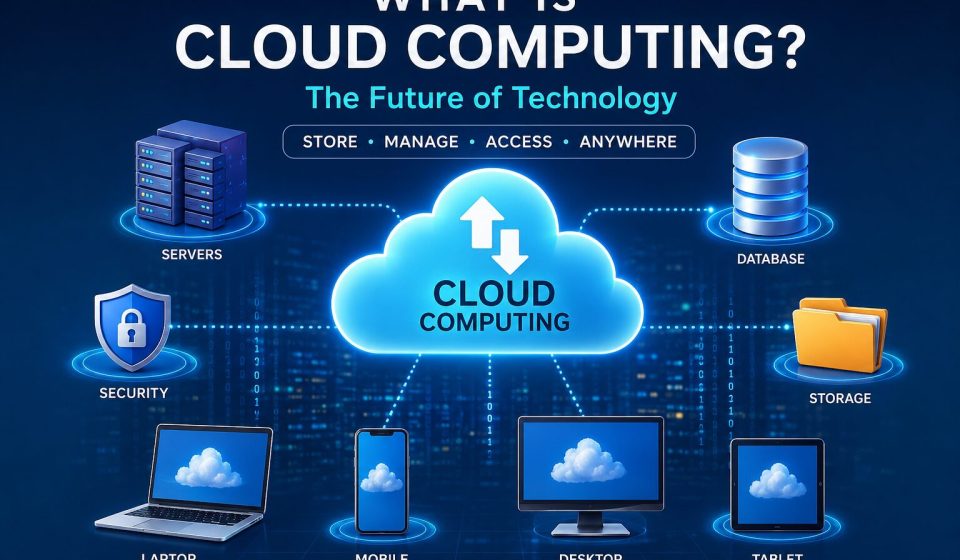

Cloud computing is a game-changer in our digital landscape. Whether you’re streaming your favorite shows, backing up photos, checking your email, or managing a business website, there’s a good chance you’re tapping into the power of cloud computing.
Instead of relying solely on your personal computer for storage and software, cloud computing lets you access a wealth of computing resources via the internet. This includes everything from storage and servers to databases, networking, software, and even artificial intelligence.
It’s revolutionized the way both individuals and businesses operate, making technology more affordable, scalable, and accessible than ever before.
Understanding Cloud Computing
Picture this: you have a laptop with limited storage capacity.
Instead of cramming thousands of photos and videos onto your hard drive, you simply upload them to an online storage service. This way, you can access your memories anytime, whether you’re on your phone, tablet, or computer.
That’s cloud computing in a nutshell.
Rather than investing in pricey hardware, organizations can rent computing resources from cloud providers and only pay for what they actually use.
How Does Cloud Computing Work?
Cloud computing operates through a vast network of powerful data centers scattered across the globe.
These data centers house thousands of servers that are all connected to the internet.
When you:
- Open an online document
- Stream a movie
- Manage your online banking
- Store files in the cloud
- Access your company’s software
your device communicates with these remote servers instead of doing all the heavy lifting on its own.
The cloud provider takes care of:
- Hardware
- Security
- Updates
- Storage
- Network infrastructure
- Backups
All you need to do is connect through the internet.
Main Components of Cloud Computing
Cloud Servers
These are robust computers that handle data processing and applications.
Examples include:
- Web hosting servers
- Database servers
- AI processing servers
Data Storage
Cloud providers offer nearly limitless storage options for:
- Documents
- Videos
- Images
- Backups
- Applications
Networking
High-speed internet connections ensure secure data transfer between users and cloud servers.
Virtualization is a game-changer, allowing multiple virtual computers to operate on a single physical machine. This not only boosts efficiency but also helps cut down on costs.
Types of Cloud Computing
Public Cloud
In a public cloud, resources are shared among a wide range of customers.
Some common examples include:
- Web hosting
- Email services
- Online storage
Benefits:
- Low cost
- Easy setup
- Highly scalable
Private Cloud
A private cloud is dedicated solely to one organization.
It’s a great fit for:
- Banks
- Government agencies
- Healthcare organizations
Benefits:
- Better control
- Enhanced security
- Greater customization
Hybrid Cloud
A hybrid cloud combines both public and private cloud environments.
Businesses often use:
- Private cloud for sensitive data
- Public cloud for less critical workloads
This setup provides flexibility and cost savings.
Cloud Service Models
Infrastructure as a Service (IaaS)
With IaaS, the provider offers:
- Servers
- Storage
- Networking
- Virtual machines
Customers take charge of managing applications and operating systems, making it ideal for developers and IT teams.
Platform as a Service (PaaS)
PaaS delivers:
- Development tools
- Databases
- Operating systems
- Application hosting
This allows developers to concentrate on building software without the hassle of managing servers.
Software as a Service (SaaS) is all about ready-to-use software that you can access right over the internet.
Here are some common examples:
- Online office suites
- Video conferencing tools
- Customer relationship management software
All you need to do is log in through your web browser, and you’re good to go!
Benefits of Cloud Computing
Lower Costs
Forget about shelling out big bucks for pricey hardware. You only pay for what you actually use.
Scalability
Need more computing power? No problem! You can ramp up or scale back your resources in an instant. This is especially handy for businesses that see fluctuations in traffic throughout the year.
Accessibility
You can access your files and applications from just about anywhere, as long as you have an internet connection.
Automatic Updates
Cloud providers take care of regular updates for you, so you don’t have to lift a finger.
Data Backup
With automatic backups, you can rest easy knowing your important information is safe from loss.
Improved Collaboration
Multiple users can dive into the same document at the same time, making it perfect for remote teams.
High Performance
Modern cloud servers are designed to deliver top-notch speed and reliability.
Business Continuity
Cloud services help organizations bounce back quickly from disasters thanks to backup and redundancy features.
Real-Life Examples of Cloud Computing
Chances are, you’re using cloud computing every day without even realizing it! Here are some examples:
- Online email services
- Video streaming platforms
- Online document editing
- Cloud photo storage
- Online gaming
- Video conferencing
- File-sharing services
- Music streaming
Cloud Computing in Business
Businesses are leveraging cloud computing for a variety of needs, including:
- Website hosting
- Data analytics
- Customer databases
- Online stores
- Mobile applications
- Enterprise software
- AI applications
- Machine learning
- Cybersecurity
- Remote work solutions
Thanks to cloud computing, startups can hit the ground running without needing to invest heavily in infrastructure.
Cloud Computing and Artificial Intelligence
AI and cloud computing go hand in hand. Cloud platforms offer:
- High-performance GPUs
- Machine learning services
- AI APIs
- Natural language processing
- Image recognition
- Voice assistants
This combination makes advanced AI tools accessible without the need for specialized hardware.
Security in Cloud Computing
Cloud providers pour a lot of resources into keeping your data safe with:
- Encryption
- Firewalls
- Multi-factor authentication
- Continuous monitoring
- Threat detection
- Regular backups
- Compliance certifications
But users have a role to play too:
- Create strong passwords
- Turn on two-factor authentication
- Keep your devices updated
- Steer clear of suspicious links
- Regularly check your account permissions
Challenges of Cloud Computing
Despite the many perks of cloud computing, there are a few bumps in the road.
Internet Dependency
You need a solid internet connection to make it work.
Privacy Concerns
It’s crucial to store sensitive data securely, using encryption and proper access controls.
Downtime
While it doesn’t happen often, cloud services can face temporary outages.
Vendor Lock-In
Switching from one cloud provider to another can take a lot of planning and effort.
Future of Cloud Computing
Cloud computing is evolving at a breakneck pace.
Some exciting trends on the horizon include:
- Artificial Intelligence integration
- Edge computing
- Serverless computing
- Multi-cloud strategies
- Green cloud infrastructure
- Quantum computing research
- Internet of Things (IoT)
- Advanced cybersecurity
- Cloud-native application development
As internet connectivity improves globally, cloud computing will become even more vital for both businesses and individuals.
Tips for Beginners
If you’re just starting out with cloud computing:
- Get familiar with the basics of cloud storage and virtual machines.
- Learn the differences between IaaS, PaaS, and SaaS.
- Try out free cloud services to get your feet wet.
- Dive into cloud security best practices.
- Work on simple projects to gain some hands-on experience.
Conclusion
Cloud computing has changed the game for how we store data, develop software, and access digital services. It brings flexibility, scalability, security, and cost savings to the table, making it a fantastic option for everyone from individuals to startups and large enterprises.
Frequently Asked Questions (FAQs)
What is cloud computing in simple words?
Cloud computing is all about accessing computing services—like storage, servers, software, and databases—over the internet, rather than depending solely on your personal computer or a local server.
What are the three main types of cloud computing?
The three main types are Public Cloud, Private Cloud, and Hybrid Cloud.
What are the three cloud service models?
The three service models are Infrastructure as a Service (IaaS), Platform as a Service (PaaS), and Software as a Service (SaaS).
Is cloud computing safe?
Absolutely! Trustworthy cloud providers implement robust security measures, including encryption, backups, and multi-factor authentication. It’s also important for users to practice good security habits.
Why is cloud computing important?
Cloud computing helps cut costs, boosts flexibility, enables remote work, fosters collaboration, and allows businesses to scale up quickly.


