
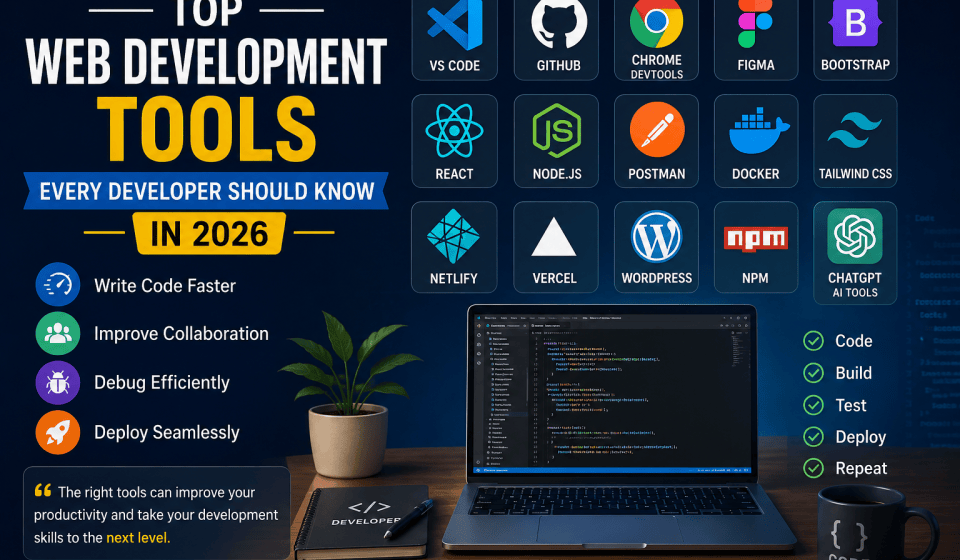

Web development has come a long way in the last decade. Today’s developers have access to a range of powerful tools that make coding faster, debugging easier, team collaboration smoother, and website deployment a breeze. Whether you’re just starting out or you’ve been in the game for a while, picking the right tools can really boost your productivity and the quality of your projects.
In this guide, we’ll dive into the top web development tools that every developer should be familiar with in 2026.

Why Web Development Tools Matter
Web development tools are crucial for developers because they help you:
- Write cleaner code
- Build websites more quickly
- Enhance collaboration
- Test and debug applications effectively
- Deploy projects with ease
- Boost website performance
Choosing the right tools can save you countless hours and elevate your overall development experience.
Visual Studio Code (VS Code)
VS Code stands out as one of the most popular code editors out there.
Key Features:
- Lightweight and speedy
- Built-in Git integration
- A vast library of extensions
- Smart code completion
- Debugging support
Best For:
- HTML
- CSS
- JavaScript
- PHP
- Python
- React
VS Code is free and perfect for both newcomers and seasoned pros.
Git and GitHub
Version control is a must-have in today’s development landscape.
Git Helps You:
- Track changes in your code
- Collaborate seamlessly with teams
- Restore earlier versions
- Manage different project branches
GitHub Offers:
- Code hosting
- Team collaboration tools
- Project management features
- Portfolio building opportunities
Every developer should get comfortable with Git and GitHub early on.
Chrome Developer Tools
This tool is built right into Google Chrome.
Features:
- Inspect website elements
- Debug JavaScript
- Test responsive designs
- Analyze performance metrics
- Monitor network requests
It’s an essential tool for frontend development.
Figma
Figma is a fantastic UI/UX design tool.
Why Developers Love It:
- Cloud-based for easy access
- Real-time collaboration capabilities
- Design prototypes effortlessly
- Simplifies developer handoff
Developers frequently collaborate with designers using Figma, making it a favorite in the industry.
Bootstrap
Bootstrap continues to be one of the most popular frontend frameworks out there.
Advantages
- Responsive layouts
- Ready-made components
- Faster development
- Mobile-first design
With Bootstrap, developers can whip up professional websites in no time.
React
React is a JavaScript library that’s all about building interactive user interfaces.
Benefits
- Component-based architecture
- Fast rendering
- Large community
- Excellent ecosystem
A lot of modern websites and applications are crafted using React.
Node.js
Node.js lets developers harness JavaScript on the server side.
Popular Uses
- APIs
- Web applications
- Real-time applications
- Backend services
It opens the door to full-stack JavaScript development.
Postman
Postman makes API testing and development a breeze.
Features
- Send API requests
- Test endpoints
- Manage collections
- Automate testing
It’s truly one of the most essential tools for backend developers.
Docker
Docker allows developers to package applications into neat containers.
Benefits
- Consistent environments
- Easy deployment
- Better scalability
- Faster testing
Docker has become a staple in modern DevOps practices.
Netlify
Netlify provides a straightforward way to deploy websites.
Features
- Free hosting
- Continuous deployment
- Custom domains
- SSL certificates
It’s ideal for static websites and frontend projects.
Vercel
Vercel is a go-to platform for building modern web applications.
Advantages
- Fast deployment
- Global CDN
- Excellent React support
- Automatic scaling
Many developers turn to Vercel for their React and Next.js projects.
WordPress
WordPress powers millions of websites around the globe.
Why Use WordPress?
- Easy content management
- Thousands of themes
- Plugin ecosystem
- SEO-friendly
It continues to be a top pick for blogs, business sites, and eCommerce stores.
npm
npm is the largest software package registry in the world.
What It Does
- Installs libraries
- Manages dependencies
- Updates packages
- Simplifies development
Most JavaScript projects depend on npm.
Tailwind CSS
Tailwind CSS has gained immense popularity among modern developers.
Benefits
- Utility-first approach
- Fast styling
- Highly customizable
- Responsive design support
It enables the creation of stunning websites without the hassle of extensive CSS.
ChatGPT and AI Coding Tools
Artificial Intelligence is reshaping the landscape of web development.
Common Uses
- Code generation
- Debugging assistance
- Documentation creation
- Learning new technologies
AI tools empower developers to work more efficiently and cut down on repetitive tasks.
How to Choose the Right Tools
Not every project needs every tool.
For Beginners
Start with:
- VS Code
- HTML
- CSS
- JavaScript
- GitHub
- Chrome DevTools
For Intermediate Developers
Add:
- React
- Node.js
- Postman
- Bootstrap
For Advanced Developers
Include:
- Docker
- CI/CD tools
- Cloud platforms
The future of web development is shaping up to be quite exciting, with a strong emphasis on:
- AI-assisted coding
- Low-code solutions
- Enhanced automation
- Quicker deployment pipelines
- Stronger security tools
Developers who keep their finger on the pulse of emerging technologies will definitely have an edge in this competitive landscape.
Conclusion
Choosing the right web development tools can significantly boost your productivity, improve code quality, and lead to successful projects. Whether you’re crafting a personal blog, a business site, or a complex enterprise application, getting a handle on these tools will make you a more efficient and skilled developer.
Start with the basics, practice consistently, and gradually build up your toolkit as your expertise grows. In the fast-paced world of web development, embracing continuous learning is essential for achieving success.


